Spinner Evolution Controls
Aim cleanly, release on the power peak, and keep momentum without fighting the spinner.
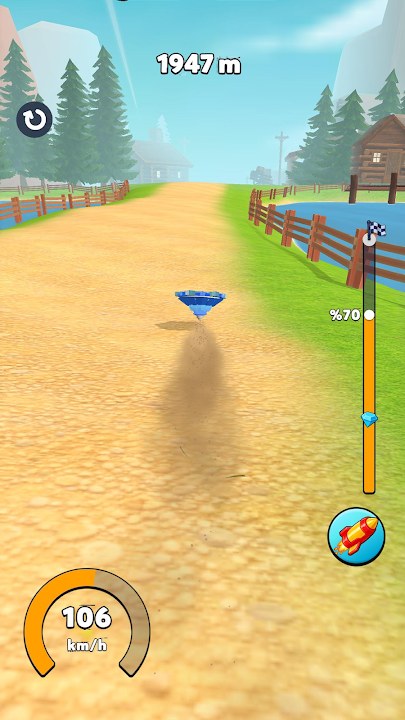
Spinner Evolution uses a simple aim-and-release loop, but distance records are won or lost in those first seconds. This page breaks down touch controls on phones and tablets, mouse or controller feel on Windows Play Games, launch rhythm, what you can and cannot steer mid-run, and the mistakes that silently delete meters. Pair it with Getting Started for the first-hour plan and Distance Records when you are ready to turn clean launches into personal bests. Evolution and form gates are covered in How to Evolve.
Core touch flow
On mobile you typically:
- Aim by dragging or tilting the launch indicator toward the path you want.
- Charge while holding so launch power builds toward a peak.
- Release at the moment the charge feels strongest and the aim line still points into open ground.
That is the entire input set for most of the early game. There is no complex skill bar and no multi-button combo. Consistency beats flashy flicks. Practice ten launches in a row on Farm with the same aim point and measure how often the spinner leaves with similar force. Variance means your release window is still floating.
Aiming well
Aim is not only “point forward.” Early Farm often rewards a line that clips coin clusters without slamming into a wall of soft obstacles. Later Jungle and Beach layouts punish lazy center aims that send you into thick smash walls before Speed and Durability are ready.
Practical aim rules:
- Prefer open lanes on practice runs; add coin lines once the launch is stable.
- Correct aim before you commit charge—do not twist the line while the meter is peaking.
- If the previous run died to a side smash, aim one step farther from that hazard instead of overcorrecting into the opposite ditch.
- Treat each environment’s first three runs as scouting: same aim, note obstacle clusters, then adjust.
Release timing and launch rhythm
Release timing decides whether Launch Power upgrades actually show up on the track. Releasing early wastes the upgrade. Holding past the sweet spot can also soften the start depending on how the charge cue behaves in your build.
Build a rhythm:
- Set aim.
- Start charge with a calm count in your head (one-two-three).
- Release on the same count every time.
- Watch the first two seconds of travel—did the spinner surge or limp?
- If limp, adjust only the release beat next try, not aim and release together.
Changing two variables at once hides what fixed the problem. Rhythm practice on Farm is faster than forcing Jungle clears with messy timing.
Mid-run control reality
Once airborne or rolling, Spinner Evolution is mostly about the physics you already launched into. Mid-run “steering” is limited compared to a twin-stick racer. You may get small course influence through bounce angles, camera-relative nudges, or simply by how the spinner reacts after impacts—but you cannot usually rewrite a bad launch with frantic swipes.
That design means:
- Invest attention in the pre-launch second.
- Accept that some coin lines are unreachable without a better angle next attempt.
- Use Durability and Speed so imperfect bounces still keep forward momentum.
- Do not spam inputs after a hit; let the spinner settle and read the new vector.
If a patch adds stronger mid-run steering, re-test on Farm before changing your whole upgrade plan. Until then, treat launch quality as the skill ceiling.
Windows Play Games and PC feel
On Windows Play Games the same aim-and-release logic applies, but input devices change the feel:
- Mouse: Click-drag to aim, hold to charge, release click at peak. Mouse precision helps micro-aim; do not over-aim into tiny gaps that mobile players would never hit consistently.
- Touchscreen laptops: Closest to phone muscle memory—prefer this if your launch timing was trained on mobile.
- Controller (if supported by the Play Games layer): Use a stick for aim and a trigger or face button for charge/release. Dead zones can make tiny aim tweaks harder; widen your target lane.
Whatever the device, keep one consistent control scheme for a session. Switching from mouse to touch mid-grind resets your release timing.
Performance tips for PC sessions: close heavy background apps so frame pacing stays smooth during the charge cue, and disable aggressive mouse acceleration if aim feels floaty.
Environment-specific control notes
- Farm: Best practice range. Wide lanes, readable obstacles, ideal for release drills.
- Jungle: Denser props. Aim for gaps; Durability matters more when a slight miss is inevitable.
- Beach / Toy: Visual clutter can hide smashables—slow your pre-aim, then keep the same release count.
- Space / Snow: Later stages often punish soft launches harder. Do not enter them until Launch Power and Speed feel boringly consistent on earlier maps. See Unlock Levels for progression order.
Sensitivity and straight-line feel
Store reviews often ask for a sensitivity slider because tiny thumb moves can feel like hard swerves at high speed. Until HyperMonk ships a dedicated sensitivity option, reduce chaos with habits:
- Finish aim before charge so you are not micro-correcting at peak power.
- Prefer a slightly wider safe lane over perfect center greed.
- On Windows Play Games, lower mouse acceleration if the aim line overshoots.
- After a bad bounce, stop adding inputs; extra swipes amplify the wobble.
- Practice “hands off after release” drills on Farm—many long runs come from a clean open plus Durability, not mid-run steering fights.
If a future patch adds sensitivity or dead-zone settings, re-test on Farm and update your personal release count before changing the whole upgrade plan.
Common control mistakes
- Flicking release. Instant taps rarely sit on the power peak.
- Aiming while charging. The line drifts and you cannot tell which error cost the run.
- Chasing every coin with aim. Side coins that force a bad first bounce cost more distance than they pay.
- Panic inputs after impact. Extra swipes often add chaos instead of recovery.
- Blaming stats only. If ten launches look different, fix timing before dumping gems into Launch Power.
- Practicing only on hard stages. Skill transfers faster when Farm reps are clean.
- Changing device mid-session. Mouse vs thumb changes the release feel.
Drill set (ten minutes)
- Five launches, fixed aim, focus only on identical release counts.
- Five launches, fixed release count, micro-adjust aim away from your last fail obstacle.
- Three “score” runs where you allow coin collection only on the main line.
- Note distances and fail reasons; spend coins per Getting Started rules or the Upgrade Planner.
Linking controls to upgrades and evolution
Clean controls multiply upgrades. Messy controls hide them. If Launch Power is high but starts still look weak, you have a timing bug, not a shop bug. If timing is locked and obstacles still delete speed, Durability and form evolution matter more—continue in How to Evolve and Distance Records.
Master the charge window once, and every later environment becomes a terrain puzzle instead of a fight with your own thumbs.
Frequently Asked Questions
Quick answers to the most common Spinner Evolution questions.
Can I steer the spinner after launching?
Only in a limited way through bounce angles and residual motion. Most distance comes from aim and release quality, not mid-run corrections.
How do I practice release timing?
On Farm, fix your aim point and release on the same mental count for ten launches. Change only one variable at a time until starts look identical.
Does Windows Play Games change the controls?
The aim-and-release loop is the same. Mouse offers finer aim; stick to one input method per session so your release rhythm stays stable.
Why do my launches feel random?
Usually you are adjusting aim and release together, or releasing off the power peak. Lock aim first, then tune only the release beat.